

Nikon Z9 with the NIKKOR Z 600mm f/6.3 VR S lens with (C2PA) Content Credentials
With all the fake content spreading through the online world, it’s more important then ever to have a means to verify photos (and video) and their authenticity. I just upgraded to Capture One’s All-In-One plan so that I can now export out photos that have the C2PA Content Credentials embedded into the file.
According to the Capture One website, (https://www.captureone.com/en) this feature was Introduced in Capture One 16.5.0. Content Credentials lets you append editing history to JPEG and TIFF images during export, showing what happened to an image in the software while preserving any previously embedded Content Credentials, such as the time of capture from a camera that supports this technology. This allows you to assess the content’s trustworthiness by providing transparency into its creation and modification.
Content Credentials are integrated as specified by the Coalition for Content Provenance and Authenticity (C2PA). For details, see https://contentcredentials.org/ and https://c2pa.org.
This feature is currently in beta in Capture One because the open-source libraries from C2PA are also in beta and may change in the future. Content Credentials are available in the All in One plan and Capture One Studio.
How to Use Content Credentials in Capture One
An internet connection is required to use this feature, and it works with JPEG and TIFF images.
In the Export window, tick the Show all options checkbox to display the Content Credentials tool.
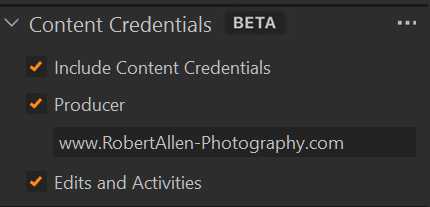
The Content Credentials tool (above) was also added to the default Export Tool Tab.
The Include Content Credentials option embeds the credentials, showing what happened to an image while in Capture One.
The Producer field may include the name of the producer, usually your name.
The Edits and Activities checkbox includes information about the edits and actions performed on the image.
These settings are saved as part of your Export Recipes and apply per recipe.
Content Credentials typically add around 10KB to 100KB to the file size and may increase export time, as some information related to the images needs to be sent over the internet for signing.
One thing to keep in mind is that having Content Credentials does not mean the image is not fake. It’s only a way to determine what happened to an image during the editing process. However, you can always edit a fake photo in Capture One.
In the next blog post, I will show you how to verify an image. Believe me, it’s no straight forward!